The term "workstation" comes from the desktop world: a workplace computer with significantly more computing power, graphics performance, and memory than an ordinary office PC, designed for compute-intensive applications such as CAD, 3D design, or data analysis. A mobile workstation carries this performance promise over into a portable device. The term itself is not protected and is not used consistently: some manufacturers already apply it to a powerful notebook, while others reserve it exclusively for devices with a dedicated graphics card certified for professional applications. This article classifies the term, distinguishes it from an ordinary notebook and from a desktop workstation, and uses devices from the RobustBook range to show which technical features define a mobile workstation in practice.
Mobile workstation: a first classification
A mobile workstation is a portable computer that exceeds a standard notebook in key performance characteristics: processor performance, but above all graphics performance, memory, and storage. The goal is to run applications that traditionally require a desktop computer, such as CAD software, 3D visualization, or compute-intensive data analysis, smoothly while on the move or directly at the point of use. Rugged devices for field use add a further dimension that plays no role for a desktop workstation: the device must fit this concentrated computing power into a housing that withstands drops, dust, moisture, and temperature fluctuations, without losing connectivity options or usability in the field.
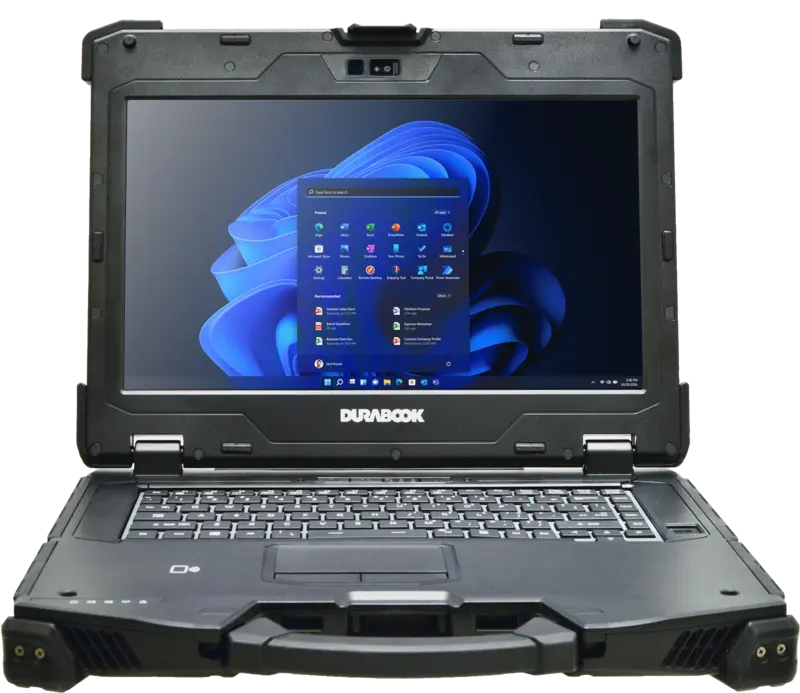
In the RobustBook range, the Durabook Z14I-HG is the model that Durabook lists as a "Mobile Workstation" in its datasheet: an Intel® Core™ Ultra 7 processor with NPU and a dedicated NVIDIA RTX 3500 Ada graphics card with 12 GB of GDDR6. The Durabook Z14I without the HG suffix, by contrast, is a rugged laptop with integrated Intel graphics and an optional NVIDIA RTX A500; in this article it serves as the counterpart. The following sections go into detail on the features that define this device class.
Processor and graphics card: the most important difference from an ordinary notebook
Processor and NPU
An ordinary rugged notebook and a mobile workstation can use the same processor family. The real difference rarely lies in the processor alone, but above all in the graphics unit and the ability to cool it continuously under load. According to the datasheet, the Durabook Z14I-HG is equipped with an Intel® Core™ Ultra 7 165U (12 MB cache, up to 4.9 GHz, 12 cores, 14 threads) or an Intel® Core™ Ultra 7 155U (up to 4.8 GHz); both include an integrated Intel® AI Boost NPU for AI-assisted tasks. In its datasheet, the Z14I without HG ranges from the Intel® Core™ Ultra 5 125U to the Core™ Ultra 7 165U.
Graphics card: dedicated instead of integrated
The core difference between a mobile workstation and an ordinary notebook lies in the graphics card. An ordinary notebook makes do with the graphics unit integrated into the processor, sufficient for office applications, map display, or form entry, but not for compute-intensive 3D rendering. The Z14I-HG, by contrast, is equipped according to its datasheet with a dedicated NVIDIA RTX 3500 Ada with 12 GB of GDDR6 video memory, optionally with an NVIDIA RTX 5000 Ada with 16 GB of GDDR6. The Z14I without HG lists only Intel Graphics in its datasheet, with an NVIDIA RTX A500 as an option.
By comparison: the standard models Durabook S14I and Durabook S15 also offer an NVIDIA graphics option according to their respective configuration lists, but as an optional external upgrade ("discrete graphics card (VGA) with 120W power supply – NVIDIA RTX A500") rather than as a graphics solution integrated and dedicated within the housing. This illustrates the difference between a rugged everyday notebook with a graphics upgrade option and a mobile workstation such as the Z14I-HG that comes with dedicated graphics performance from the outset. The Getac X600 in the range also offers a workstation-capable graphics card as an option: according to the product page, an NVIDIA® Quadro® RTX3000 can optionally be added to the integrated Intel® UHD Graphics, a GPU series specifically designed for professional CAD and visualization software.
Memory and Storage
Compute-intensive applications such as CAD models, large GIS datasets, or several analysis tools open at the same time require more memory than a simple notebook typically provides. For the Durabook Z14I-HG, the datasheet lists 32 GB to 64 GB of DDR5 memory and a 512 GB NVMe PCIe SSD, optionally 1 TB or 2 TB, plus an optional second NVMe SSD and a third SATA SSD. The Z14I without HG starts with 16 GB of RAM (optionally up to 64 GB) and a 256 GB SSD (optionally up to 2 TB).
The range is even more pronounced with the Getac X600: according to the product page, it offers memory from 16 GB up to 128 GB of DDR4 as well as storage capacity of up to three replaceable SSDs totaling up to 6 TB, a figure that reaches the order of magnitude of some desktop workstations, housed in a portable, rugged enclosure.
A note for context: alongside the laptop variant, the configurator on the Z14I product page also lists a "Z14I (G3) Portable Server" variant. This is not a mobile workstation in the sense described here, but a separately available expansion server box with up to four factory-installed SSDs (either 1 TB or 2 TB per drive) for storage and RAID applications in the field. Anyone specifically looking for a mobile workstation for compute and graphics load should not confuse this storage variant with the Z14I-HG.
The same separation can be found at Getac. Alongside the Getac X500 there is the Getac X500 Server, whose product page lists an Intel® Xeon® processor (without a model designation), plus 8 GB of memory as standard with up to 64 GB optionally, a 500 GB SATA hard drive with optional RAID 5, and two Ethernet and two serial ports. This, too, is not a mobile workstation for compute and graphics load, but a device for server and storage tasks in the field.
Display, connectivity, and access protection
Display
Anyone assessing CAD models, construction plans, or sensor data in the field needs a display that stays readable even in direct sunlight. For the Durabook Z14I-HG, the datasheet lists a 14.0-inch display with Full HD resolution and 1200 nits of brightness, without the note "optional". For the Z14I and the S14I, the datasheet gives 1200 nits as an option; for the S15 it is 1000 nits (optional), for the S15AB 400 to 500 nits (optional). The Comparison Table Laptops puts the brightness values of all laptops side by side.
Ports
A mobile workstation must be able to connect to a wide variety of peripherals in the field, from measuring instruments to serial sensors to external monitors. According to the datasheet, the Z14I-HG features 2× Thunderbolt 4, 2× RJ45 (Ethernet), 2× serial interface (RS232/RS422/RS485), VGA, and HDMI. For the S14I, the datasheet lists 1× RS-232 and optionally a second. An overview of which other rugged laptops in the range come with a serial interface is provided on the page RS232 Built In: Laptop with Serial Interface Compared.
Access Protection and Expansion
For professional use involving sensitive data, the datasheet of the Z14I-HG lists a smart card reader and an ExpressCard 54 slot, and optionally Windows Hello with a 5.0 MP infrared camera. On the S14I, the smart card reader and ExpressCard 54 are optional according to the datasheet. The Z14I without HG additionally lists an optional PCI Express 3.0 expansion module with two slots in the manufacturer datasheet.
Certifications: rugged and mobile at the same time
What additionally distinguishes a mobile workstation from a desktop workstation are the ruggedness certifications required for field use, which play no role in a server room or office. According to the datasheet, the Z14I-HG is tested to MIL-STD-810H, including against shocks, vibration, rain, dust, high altitude, frost/dew, high and low temperatures, temperature shock, and humidity, and to MIL-STD-461G for electromagnetic compatibility. It has sealed port covers, is designed for humidity from 5% to 95%, and operates from −29 °C to 63 °C (storage −51 °C to 71 °C).
For dust and water protection class (IP rating), the datasheet of the Z14I-HG lists IP66: complete dust protection combined with protection against powerful water jets. The Z14I without HG is also IP66-certified. A detailed explanation of the IP classification is provided in the article The Various IP Protection Classes. The Getac X600, too, is certified according to its own product page to IP66 as well as MIL-STD-810H and MIL-STD-461G, and according to its specifications withstands drops from up to 1.2 meters.
Mobile workstation compared to a desktop workstation
A desktop workstation is tied to the mains power supply, can be cooled without limit, and can be equipped with multiple graphics cards, a large amount of memory, and several internal drives without having to consider weight or battery life. A mobile workstation, by contrast, must make trade-offs between computing power, cooling, battery life, and weight within a portable, rugged housing. This is reflected, among other things, in weight: according to the datasheet, the Z14I-HG weighs 4.9 kg (depending on configuration and accessories), the Z14I without HG 3.6 kg, and the S14I 2.37 kg. The difference from a desktop workstation is also apparent in power supply: the datasheet of the Z14I-HG lists a 240 W power supply, the datasheet of the Z14I without HG a 90 W power supply (optionally 120 W).
The Getac X600 shows how close a mobile workstation can come to a desktop workstation: according to the product page, it offers 11th-generation processors (Intel® Core™ i5-11500HE, optionally Core™ i7-11850HE or Xeon® W-11865MRE), up to 128 GB of DDR4 memory, up to 6 TB of SSD storage across three replaceable drives, and optionally an NVIDIA Quadro RTX3000, figures more typically found in stationary workstations than in notebooks. Even so, according to the datasheet, the device remains usable on the move and is certified to IP66 as well as MIL-STD-810H/461G. The decisive difference from a desktop workstation remains, however: computing power is tied to the mobile device's built-in cooling system and battery or power-supply capacity, and unlike a desktop tower, it cannot be increased at will through additional internal expansion cards.
When is the premium for a mobile workstation worth it, and when isn't it?
A dedicated graphics card, more memory, additional ports, and further certifications generally mean a higher procurement cost compared to a simple rugged notebook. Whether this premium is worthwhile depends on the actual workload running on the device, not on whether "more performance" seems desirable in general.
The premium is generally worthwhile if graphics- or compute-intensive software is actually running in the field: CAD design and review directly on the construction site, 3D visualization of plants and machinery, GIS evaluation of large geodata sets, or AI-assisted data analysis on site. Such tasks are typically found in the industries also described on the pages Construction Site Tablets and Construction Site Laptops and Industry Tablets and Laptops, anywhere planning or evaluation work takes place directly at the point of use, rather than only after returning to a stationary computer in the office. Even when several compute-intensive applications must be open at the same time or large files are processed locally, more memory and a dedicated graphics card pay off, because the application would otherwise noticeably stutter or calculations would take disproportionately long.
By contrast, the premium is generally not worthwhile if the device is used mainly for form entry, documentation, communication, map display, or office applications. For these tasks, the graphics unit integrated into the processor of a rugged standard notebook such as the Durabook S14I or S15 is sufficient; the additional computing and graphics performance of a mobile workstation remains unused, while at the same time more weight has to be carried and a shorter battery life under load has to be accepted. Anyone unsure which configuration suits their own application will find a direct comparison of the specifications between the models in the Comparison Table Laptops.
What sets a mobile workstation apart from a notebook and a desktop
A mobile workstation differs from an ordinary rugged notebook primarily through a dedicated, professional graphics card instead of an integrated graphics unit, through more memory and storage, and through additional ports and security features such as a smart card reader and ExpressCard slot. It differs from a desktop workstation through its dependence on battery life, housing cooling, and power-supply capacity, but in return it brings certifications such as IP66 and MIL-STD-810H, which are necessary for field use but play no role for a stationary workstation in an office. In the RobustBook range, this role is filled primarily by the Durabook Z14I-HG with a dedicated NVIDIA RTX 3500 Ada graphics card, complemented by the Getac X600 with an optionally available NVIDIA Quadro RTX3000 and a significantly higher maximum memory and storage capacity. A complete comparison of all specifications is provided in the Comparison Table Laptops.
If you have questions about whether a standard notebook is sufficient for your application or a mobile workstation makes sense, the RobustBook team is happy to help you select the right model.