This rugged tablet comparison puts ten tablets from the range of Durabook, Getac, Fieldbook and RuggON side by side. It is a datasheet comparison and not a lab test: we did not measure the devices ourselves but set next to each other the manufacturer figures given in the datasheets on this website. You will find all models in the range on the page Rugged Tablet: 34 models at a glance. Here the subject is ten models from four manufacturers and the question of how they differ.
What “test” means in this comparison
A test in the strict sense measures: brightness with a luminance meter, battery life under a defined load, drop height in a drop test. We do not do that here. In this article, “test” means that we check the core data of the datasheets and set them side by side. A figure in the table is a manufacturer specification, not a measurement result of ours.
That is also why there is no test winner. A tablet with the brightest display on paper may be too heavy for your use. The comparison shows which values are documented and where the datasheet is silent. From that you can draw up a shortlist and check it on a sample device.
Ten rugged tablets compared by datasheet
The table shows display, ingress protection, brightness, weight, operating temperature and battery. All ten tablets are tested to MIL-STD-810H. For the Durabook devices the datasheet gives the battery run time, for the other manufacturers only the capacity.
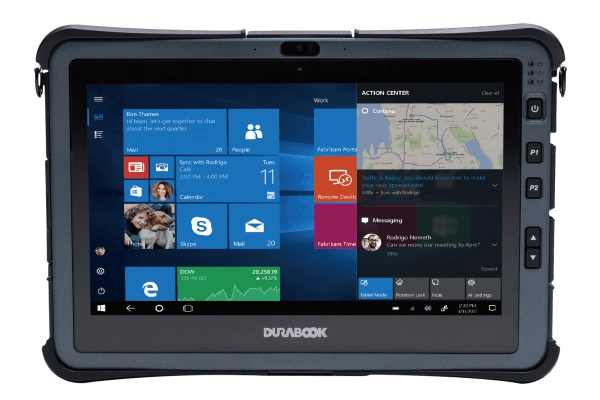
Durabook U11I, one of the ten tablets compared.
Swipe sideways to see all 10 rows
| Model | Display | Ingress protection | Brightness | Weight | Operating temperature | Battery |
|---|---|---|---|---|---|---|
| Durabook R8 | 8.0 inches | IP66 | 800 nits | 0.86 kg | -20 °C to 60 °C | 8.5 h (optional 17 h) |
| Durabook R11 | 11.6 inches | IP66 | 1000 nits (optional) | 1.2 kg | -20 °C to 60 °C | 8.5 h (optional 15 h) |
| Durabook U11I | 11.6 inches | IP66 | 1000 nits (optional) | 1.39 kg | -20 °C to 60 °C | 10 h (optional 20 h) |
| Getac UX10 | 10.1 inches | IP66 | 1000 nits | 1.15 kg | -29 °C to 63 °C | 4070 mAh |
| Getac ZX10 G2 | 10.1 inches | IP66 | 1000 nits | 906 g | -29 °C to 63 °C | 4990 mAh |
| Getac ZX80 | 8 inches | IP67 | 1000 nits | 590 g | -29 °C to 63 °C | 4060 mAh |
| Getac F110 G7 | 11.6 inches | IP66 | 1200 nits | 1.49 kg | -29 °C to 63 °C | 2 × 2680 mAh |
| Fieldbook N101G2 | 10.1 inches | IP65 | 700 nits | 1.14 kg | -20 °C to 60 °C | 10000 mAh |
| RuggON PX501 G5 | 10.1 inches | IP65 | 1000 nits | 1.36 kg | -20 °C to 60 °C | 4500 mAh |
| RuggON Sol 7 | 12 inches | IP65 | 1000 nits | 1.5 kg | -20 °C to 60 °C | 2 × 3010 mAh |
Ingress protection and standards: who is protected how
Six of the ten tablets have IP66 and are therefore dust-tight and protected against powerful water jets: Durabook R8, R11 and U11I as well as Getac UX10, ZX10 G2 and F110 G7. The Getac ZX80 has IP67 and withstands temporary immersion. Fieldbook N101G2, RuggON PX501 G5 and RuggON Sol 7 have IP65, which means they are dust-tight and protected against water jets from a nozzle. The article The Different IP Protection Classes explains the levels in detail.
All ten carry MIL-STD-810H, the test standard for shock, vibration and temperature. In addition, seven datasheets list an electromagnetic compatibility test to MIL-STD-461: Durabook R8 (461G), R11 (461F), U11I (461G), Getac UX10 and F110 G7 (461G each) as well as RuggON PX501 G5 and Sol 7 (461G each). For the ZX10 G2, ZX80 and N101G2 the datasheet does not list this test. Anyone who works in a vehicle or next to radio equipment should look at what MIL-STD-461 tests for.
Display and brightness in the datasheet
Display sizes range from 8 inches for the Durabook R8 and Getac ZX80 to 12 inches for the RuggON Sol 7. Four tablets have 10.1 inches: Getac UX10, Getac ZX10 G2, Fieldbook N101G2 and RuggON PX501 G5. Three have 11.6 inches: Durabook R11, Durabook U11I and Getac F110 G7. How size and resolution affect use is covered in the article Screen Sizes and Resolutions for Mobile Use.
On brightness the Getac F110 G7 leads with 1200 nits. Next, at 1000 nits, come the Getac UX10, the Getac ZX10 G2, the Getac ZX80, the RuggON PX501 G5 and the RuggON Sol 7. The Durabook R8 lists 800 nits, the Fieldbook N101G2 700 nits. For the Durabook R11 and the Durabook U11I, 1000 nits is an option in the datasheet. The figure tells only half the story, because the anti-glare treatment also decides how readable a display is. Both are explained in the article Sunlight-Readable Displays.
Weight and battery: hours versus milliamp hours
The Getac ZX80 weighs 590 g and is the lightest device in the comparison, followed by the Durabook R8 at 0.86 kg and the Getac ZX10 G2 at 906 g. At the other end are the RuggON Sol 7 at 1.5 kg and the Getac F110 G7 at 1.49 kg. On the Getac ZX10 G2 the optional high-capacity battery adds 140 g according to the datasheet, and the RuggON PX501 G5 notes deviations depending on configuration and accessories.
On run time only the Durabook datasheets are specific: 8.5 h for the R8 and R11 (optionally 17 h for the R8 and 15 h for the R11) and 10 h for the U11I (optionally 20 h). Getac, Fieldbook and RuggON give capacities, for example 4990 mAh for the ZX10 G2 or 10000 mAh for the N101G2. A run time cannot be derived from mAh alone, because the voltage and the power consumption of the device are missing. If you want to swap the battery during operation, you will find the details under Swappable Battery and Hot-Swap.
Windows or Android: the difference behind the figures
The operating system decides which software runs. The Getac ZX10 G2 and the Getac ZX80 run Android 15.0 on a Qualcomm QCS6490, the Fieldbook N101G2 runs Android 14 on a Helio G99. The Durabook U11I has Windows 11 Professional, the Getac UX10 Windows 11 Pro and the RuggON Sol 7 Windows 11 GAC. On the RuggON PX501 G5, Windows 11 GAC is optional. Windows specialist applications do not run on the Android devices; they have to be available as an app or a web application. The article Rugged Windows Tablet or Rugged Android Tablet describes the trade-off.
A second difference lies in the ports. The RuggON PX501 G5 and the RuggON Sol 7 each have a serial RS-232 port as standard. On the Durabook R8 and the Durabook U11I RS-232 is optional, and on the Fieldbook N101G2 a serial DB9 connector is available in place of the RJ45 port. For the Getac ZX80 the datasheet lists no serial port on the device. If you want to connect measuring instruments or older controllers, you should clarify this before choosing. What RS-232 does is explained in the article RS-232 interface.
What the datasheets do not answer
The datasheets give drop heights for only some of the devices: 1.80 m for the ZX10 G2 and ZX80, 1.2 m for the N101G2. According to the tablet comparison table, the drop height is 180 cm for the U11I and 120 cm for the R11 and the R8. Whether a touchscreen works with gloves or in rain is stated in the datasheets of the RuggON PX501 G5, the RuggON Sol 7 and the Getac F110 G7, and for the U11I in the tablet comparison table. For the other devices the information is missing, and a test with your own gloves settles it faster than any request. The article Touch in Rain and With Gloves fits here.
Cold is not in the table either. For the Getac ZX10 G2 the range down to -29 °C applies only on mains power according to the datasheet; on battery power it is -15 °C with a standard battery. Such restrictions are in the footnotes of the manufacturer PDFs, so read them before you order.
Frequently asked questions
Which is the best rugged tablet?
That cannot be answered from datasheets, because each device wins in a different row. The Getac ZX80 is the lightest, the Getac F110 G7 the brightest, and the Durabook U11I has the longest documented run time. The question is which row counts for your use.
How does this comparison differ from a lab test?
A lab test measures, this comparison reads. All values come from the manufacturers' datasheets, and we have checked neither brightness nor battery life nor drop height ourselves.
Is an outdoor tablet the same as a rugged tablet?
In everyday usage, yes. Both terms mean a tablet with a high ingress protection rating that is tested to MIL-STD-810. On the outdoor tablet page the threshold is IP65, and all 34 models are listed there.
Do I need a Windows tablet, or is Android enough?
That depends on your software. If it runs as an app or in the browser, Android is enough. If it needs Windows drivers or a specialist application for Windows, you need a Windows tablet.
Conclusion: which tablet for whom
If you want a light device for a jacket pocket, look first at the Getac ZX80 (590 g) and the Durabook R8 (0.86 kg). If you need a documented run time in hours, you cannot get past the Durabook R11 and U11I. The Getac F110 G7 has the highest brightness in the comparison, the RuggON Sol 7 the largest display. Android software points to the ZX10 G2, ZX80 or N101G2. Windows software points to the Durabook devices, the UX10, F110 G7 and Sol 7; on the PX501 G5 Windows is an option according to the datasheet.
The values in the table apply to the standard variants. For potentially explosive areas there are separate Ex variants; more about them is in the article ATEX and Ex protection. If you type a lot, run calculations or open CAD drawings, you are better served by a rugged laptop than by any of these tablets. And if you do not yet know whether a tablet is the right device at all, read Finding the Perfect Rugged Outdoor Tablet first.