Anyone buying a vehicle-mount computer or a forklift terminal first faces a fundamental question: a permanently installed vehicle computer, or a rugged tablet in a mount that can be taken out when needed? Both work, and both create follow-on costs elsewhere. On top of that come questions that never arise with an office device: the vehicle electrical system does not deliver clean mains-style voltage, the driver's position vibrates, the warehouse has dead spots between the access points, and in the cold store the display fogs up. This article works through the decision step by step – from device type through power supply, mount and wireless to glove operation and safety at the driver's position – and shows what is documented on the product pages for the models in the RobustBook range.
Fixed-Install Terminal or Rugged Tablet in the Vehicle
A mobile vehicle terminal in the narrower sense is a vehicle computer: a device that stays in the vehicle permanently, connects directly to the vehicle electrical system and brings the interfaces of the vehicle world with it. The alternative is a rugged tablet that sits in a dock or mount and is taken out at the end of the shift.
The Vehicle Computer for Fixed Installation
In the range, this is the Vulcan series from RuggON. The product pages describe the RuggON Vulcan 10X (Intel processor, Windows) and the otherwise identical Vulcan 10A (Qualcomm processor, Android) as devices "for fixed installation", not for carrying; both weigh 3.2 kg and have a 10.4 inch display. The interfaces are typical for this design: according to the data sheet excerpt on the product page of the 10X, there are several serial ports (RS-232, RS-485), two Gigabit Ethernet ports, digital inputs and outputs and, optionally, CAN bus 2.0B or SAE J1939. This is the equipment needed to connect a terminal to vehicle data, scanners or sensors.
The advantages lie in continuous operation: fixed cabling, no removal, no loss, a power input for the vehicle electrical system and ignition detection in the device (more on both below). The price for this is immobility: anyone who also needs the device on foot – at goods receiving, at the ramp, in the office – needs a second device.
The Tablet in a Vehicle Dock
The rugged tablet in a dock reverses this trade-off. It is flexible, can move between vehicles, can serve as a handheld in the warehouse and needs only one dock position per vehicle. The drawbacks are the additional dock part and the question of where the device stays outside the shift. For the latter, the accessory overview for the Durabook tablets describes a locking bar with a key slot: the tablet can be "safely left in the vehicle without worrying about theft". For shift operation the battery matters: the product pages list two hot-swappable batteries for the Getac K120 and the Getac F110 G7, for example; background is in the article Swappable Battery and Hot-Swap.
As a rule of thumb for the decision:
- Fixed installation if the vehicle always needs the same terminal, vehicle interfaces (CAN, digital inputs and outputs) are involved and nobody has to take the device along.
- Tablet in a dock if the same device is also needed outside the vehicle, vehicles change, or the number of devices is to be smaller than the number of vehicles.
Power Supply in the Vehicle: Electrical System, Voltage Spikes, Ignition
The power supply is the most common source of failure in vehicle terminals, because it gets the least space in data sheets. Three points are decisive.
Which Voltage Is Present?
Road vehicles have a 12-volt or a 24-volt electrical system depending on the vehicle class; according to the standards catalogue, ISO 7637-2 (electrical transient disturbances on supply lines) is defined for passenger cars and commercial vehicles with a 12 V or 24 V electrical system. Industrial trucks are different: according to Verkehrsrundschau, the traction batteries of electric forklifts have 24, 48 or 80 volts. A forklift terminal is therefore often connected to a considerably higher voltage than a vehicle terminal in a van.
This directly affects device selection. The Vulcan product pages give a wide-range input of 9 to 60 V DC. The vehicle adapters for the tablets and laptops in the range are specified more narrowly: for the Getac ZX80 the product page lists a vehicle DC-DC adapter with 65 W at 11 to 32 VDC, for the Getac V110 G3 a DC-DC vehicle adapter with 120 W and likewise 11 to 32 VDC, and for the Durabook models R10, R11, R11L and U11I a vehicle adapter with 11 to 32 V DC and 90 W. An input range up to 32 V arithmetically covers 12 V and 24 V systems, but not a 48 or 80 V forklift battery. That requires an upstream converter or a device with a wide-range input. Clarify this at the vehicle before ordering, not afterwards.
Voltage Spikes and Dips
A vehicle electrical system is not a laboratory power supply. The ISO 16750-2 standard describes electrical loads on devices in road vehicles and names, among others, reverse polarity, jump start, brief voltage dips and the so-called load dump. In a load dump a battery is disconnected while the alternator is still charging; a technical article on this test pulse gives spikes of up to 202 V and decay times of up to 400 ms. In practice this means: the device and its vehicle adapter should be intended for this environment; an arbitrary power supply from the accessories trade is not an equivalent solution. The product pages in the range do not state specific test values according to ISO 7637-2 or ISO 16750-2; if your vehicle specification requires them, ask the manufacturer of the respective device.
Ignition Detection and Controlled Shutdown
A vehicle terminal should switch on and off with the vehicle, without the driver having to operate it and without draining the starter battery overnight. For the Vulcan 10X, three things are listed: ignition detection ("ignition sense") with adjustable delay on switch-on and switch-off, wake-up via the real-time clock ("Wake on RTC") and an internal backup battery for controlled shutdown. The product page explicitly describes the battery as a buffer, not as the main supply: it keeps the device running when the vehicle voltage drops out, until it has shut down cleanly. The Vulcan 10A mentions "intelligent ignition management" and likewise a backup battery. For forklifts, clarify with the vehicle manufacturer which signal on the vehicle can be used as the ignition signal.
Vibration and Shock at the Driver's Position
A forklift terminal experiences shocks every day over ramps, thresholds and floor joints; a device in a harvesting machine experiences permanent vibration. The military standard MIL-STD-810 contains dedicated test methods for this: Method 514 covers vibration, Method 516 shock. What the standard is and what it is not – in particular that it is not a certification but a catalogue of test procedures – is explained in the article MIL-STD-810 for Laptops and Tablets; here just this much: the statement "MIL-STD-810H" alone does not say which methods were tested at which level.
For selection, it is worth looking at what the product pages actually state. For the Vulcan 10X it says "MIL-STD-810H (Vibration, shock and optional salt fog)" as well as class 5M3 according to IEC 60721-3-5; the Vulcan 10A gives the same class as "vibration and shock resistance". The Getac ZX80 lists "resistance to vibration and drops from a height of 1.80 m". Note: these statements apply to the device. The dock, mount and vehicle bracket are separate components; ask separately for their data on vibration and load capacity.
Mount, VESA and Quick-Release
Between the vehicle floor and the device there is usually a chain of holders: vehicle bracket, arm or plate mount, then the dock. The link is often the VESA standard. It describes hole patterns for flat-panel displays; for small displays, according to the Wikipedia article on the VESA interface, these are square patterns of 75 × 75 mm or 100 × 100 mm with M4 screws. The accessory table for the Durabook docks lists four mounting holes for VESA mounting without stating the hole spacing; ask for it before buying a mount. Third-party system mounts, for example in the style of the RAM Mount systems, are only an option if the hole pattern, load capacity and vibration resistance match the dock.
Passive Mount or Dock with Connections
Two designs need to be distinguished. The passive mount holds the device mechanically; power and antennas come via cables on the device. The dock holds it and routes power, network and antennas through contacts, so that simply inserting the device is enough. The Durabook configurators in the range list both forms separately: for the R10, for example, "R10 mount (passive / car adapter available separately)" alongside the "R10 Vehicle Lite Dock" with or without Tri-RF pass-through, for the R11 and R11L the "R11 Vehicle Light Dock" (with or without Dual-RF) and for the U11I additionally the PMT docks "Slim Profile" and "Expanded", each with and without Tri-RF pass-through. For the Getac ZX80, the product page and configurator list "vehicle mount" and "vehicle dock" separately, for the Getac V110 G3 the entry "vehicle dock".
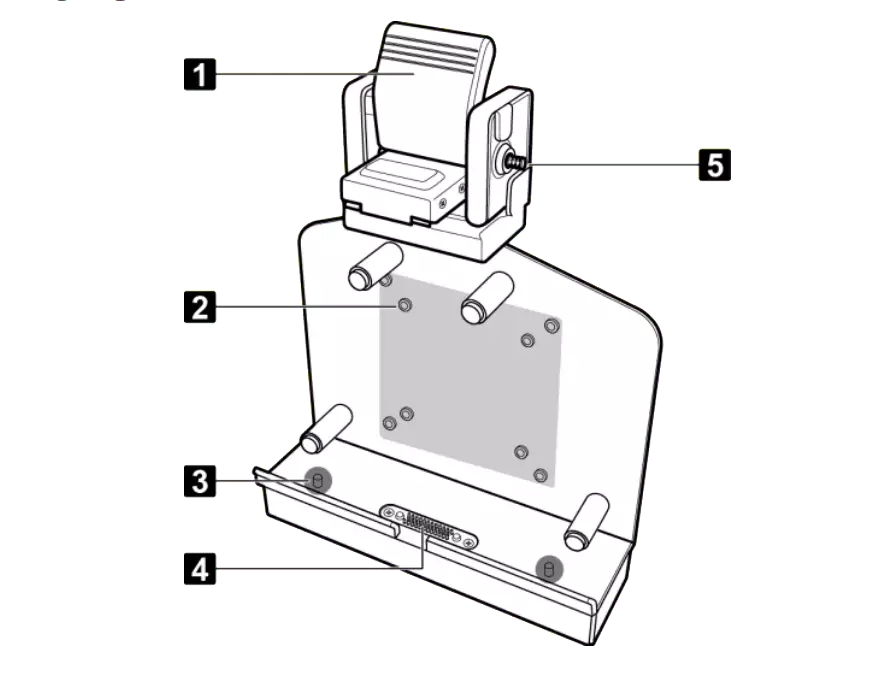
What a vehicle dock for the Durabook tablets R11L, R11 and U11I actually offers is described in the accessory comparison table for tablets: a lock, an alignment opening against incorrect insertion, four mounting holes for VESA mounting, a locking bar with a key slot, Gigabit Ethernet, USB ports, HDMI, RS-232, a DC input and antenna connections for WWAN (or LTE) and GPS. The U11I additionally has a slot for a Kensington lock. A vehicle dock has been announced for the Durabook laptops S14I and Z14I; clarify availability before planning.
Where We Cannot Document Anything
Not every device that fits into a vehicle has a dock of its own. The configurators of the Getac K120 and the Getac F110 G7 list office and USB-C docks, but no vehicle dock and no vehicle adapter; the K120 lists a detachable keyboard dock with RF antenna pass-through. That does not mean a vehicle solution is ruled out – only that we do not document one here. For these models, ask before planning them for installation.
Wireless: Wi-Fi Roaming in the Warehouse, Cellular Outdoors, GNSS
A forklift terminal moves through the entire warehouse and thus through the radio cells of many access points. Its behaviour during the handover decides whether bookings run without interruption.
Wi-Fi Roaming with 802.11k, 802.11r and 802.11v
Three extensions of the Wi-Fi standard share the task. 802.11k gives the device a list of neighbouring access points, so that it has fewer channels to scan. 802.11r speeds up the login at the new access point by passing key material on within a mobility domain instead of repeating the full handshake; the standard was published in 2008. 802.11v allows the network to steer a device to a better access point, which helps resolve "sticky" clients. According to a vendor guide, however, the decision to switch is always made by the device.
In the range, these extensions are documented for the Vulcan vehicle computers: the Vulcan 10X lists Wi-Fi "802.11 a/b/g/n/ac/v/r/k", the Vulcan 10A "Wi-Fi 802.11ax (with Fast Roaming 802.11v/r/k)". For the other models, the product pages give the Wi-Fi generation (for example Wi-Fi 6E for the Getac ZX80, K120 or V110 G3), but no roaming extensions. That is not a statement that they are missing – only that it is not documented here. Expect two pitfalls: the infrastructure must support the extensions, and older handheld scanners on the same network may no longer connect if 802.11r is enabled across the board; depending on the manufacturer, the remedy is mixed-mode operation or a second network name. More on the standards themselves is in the article Wi-Fi 6E and Wi-Fi 7 in Industrial Environments.
LTE, 5G and GNSS Antennas
Outside the warehouse, in the yard or on the road, the cellular module takes over. In the vehicle, the body, cab or warehouse roof stand in the way of the antenna, which is why many docks route the antenna signals to the outside: the configurators of the ZX80 and V110 G3 list an "RF antenna pass-through for GPS, WWAN and WLAN", the Durabook devices an "RF pass-through" (Tri-RF for the U11I and R10). The Vulcan 10X optionally offers 4G LTE or 5G with two Micro-SIM slots as well as optional GNSS with GPS, Galileo, GLONASS, BeiDou and QZSS. How cellular works in the device and what to consider with antennas is explained in the article 5G and LTE Built Into the Device; for the accuracy of satellite positioning and RTK, see GPS, GNSS and RTK.
Glove Operation, Cold in the Cold Store, Condensation
In the cold store three things come together: gloves, sub-zero temperatures and the move into warm zones.
Touch with gloves. According to the manufacturer's description, the Vulcan 10X has a projected-capacitive touchscreen that supports rain and glove mode; a 5-wire resistive display with defroster is available on request, and optionally a defrost key ("defrost / defog"). The Vulcan 10A likewise lists glove and rain mode and an optional defroster "for cold-storage logistics". For the K120 and the F110 G7, Getac lists displays that can be operated with gloves.
Temperature range. The product pages give operating temperatures as follows: Vulcan 10A −30 to 60 °C, Vulcan 10X −30 to +55 °C, Getac K120, F110 G7 and ZX80 −29 to +63 °C, Durabook R11 and U11I −20 to 60 °C. The pages make no general commitment for continuous operation in a cold store; the closest is the Vulcan 10A with the optional defroster for cold-storage logistics. Therefore compare the operating range with the actual room temperature. What cold does to the battery is explained in the article Operating Temperature of Rugged Devices.
Condensation. If the air is cooled down to the dew point, condensation forms. This is exactly what happens when a chilled terminal moves from the cold store into the warm, humid warehouse: housing and display glass fog up. The Getac ZX80 states "95% relative humidity, non-condensing" as an ambient condition; the specified range therefore excludes condensing conditions. Plan for as few temperature changes per shift as possible and ask the manufacturer how it assesses operation immediately after such a change.
Operation While Driving and Safety
The technology allows drivers to type while driving; this is not permitted or sensible everywhere. The following notes are general guidance, not legal advice – what is binding is the risk assessment in your company and, in case of doubt, the advice of your occupational safety specialist.
- View of the roadway: DGUV Regulation 68 "Industrial Trucks" (Flurförderzeuge) requires in § 12 para. 1 that industrial trucks may only be driven if the driver has sufficient view of the roadway or is given directions. According to the implementing instruction, aids such as camera and monitor are permissible where the view is insufficient, and the selection must follow ergonomic criteria. For mounting this means: a terminal must not obstruct the view, and its position belongs in the risk assessment.
- Public road traffic: § 23 para. 1a StVO (German Road Traffic Regulations) permits the vehicle driver to use an electronic device that serves communication, information or organisation only if the driver does not hold it in the hand and either operates it by voice control or only with a short glance at the display adapted to the situation. The provision expressly names touchscreens and tablets.
- Software support: The Getac ZX80 lists the "Getac Driving Safety Utility" in its software list (preinstalled as a trial version, also listed among the optional programs). The product pages do not state what exactly it does; ask if you expect something from it.
What helps organisationally is what is good practice anyway: load jobs before starting to drive, limit confirmations to a few taps, put scanner and sign-off on the vehicle instead of on the menu navigation.
Frequently Asked Questions
Vehicle-mount computer or tablet in a mount: which makes more sense for the forklift?
That depends on whether the device stays in the vehicle. A permanently installed vehicle computer such as the Vulcan 10X brings a wide-range power input, ignition detection and vehicle interfaces. A tablet in a dock is more flexible, but needs a dock, a vehicle adapter and, where applicable, a converter if the forklift runs at 48 or 80 V.
Is a 12/24 V vehicle adapter enough on an electric forklift?
Only on forklifts with a 24 V electrical system. The vehicle adapters in the range give an input range of 11 to 32 V. At 48 or 80 V a converter is needed, or a device with a wide-range input, as the Vulcan series lists with 9 to 60 V.
Do I need Wi-Fi roaming according to 802.11k/r/v?
If your vehicle covers large areas with several access points and runs applications that cannot tolerate an interruption, yes. Then the device, access points and controller must support the extensions, and older clients on the same network have to be tested. The Vulcan 10X and 10A list the extensions on their product pages.
Which RobustBook models have vehicle docks?
They are documented in the configurator or in the accessory table for the Durabook tablets R10, R11, R11L and U11I, for the Getac ZX80 and for the Getac V110 G3. The Vulcan 10A/10X vehicle computer is itself designed for fixed installation. For the Getac K120 and F110 G7, please ask us directly about suitable vehicle solutions.
May the driver operate the terminal while driving?
In public road traffic only within the limits of § 23 para. 1a StVO, within the company according to your risk assessment. Legally binding advice comes from your occupational safety specialist or from legal counsel.
Conclusion: Clarify the Vehicle and the Network First, Then the Device
The choice between a vehicle-mount terminal and a tablet in a dock is decided by the application: if the device stays in the vehicle and needs vehicle interfaces, a lot speaks for fixed installation; if it is to move between vehicles and handheld use, for the tablet with a dock. Regardless of this, you should clarify three things at the vehicle in advance: which electrical system voltage is present (24, 48 or 80 V on forklifts), how the antennas get to the outside and how the device switches between access points in the warehouse. The industry page Logistics shows typical requirements for warehouse and order picking, and the page Transport for vehicle fleets and delivery traffic.
If you tell us the vehicle type, electrical system voltage and place of use, we will help you select the device, mount and vehicle adapter.