display 3 × 14.0 inches · protection rating not stated · MIL-STD-810H, MIL-STD-461G · weight 9.8 kg (depending on options). All core specs with sources in the datasheet.
Contact us for information on hire purchase and leasing options!
Manufacturer description
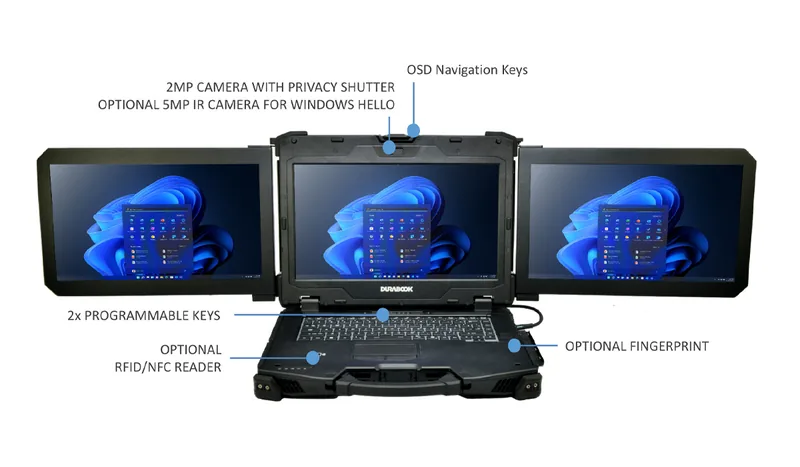
The manufacturer calls the Durabook Z14I-DX3 a “Triple-Screen Workstation”: a rugged laptop with three foldable 14.0 inch displays (tri-fold), an Intel Core Ultra processor with integrated NPU and connections such as Thunderbolt™ 4, LAN and serial ports. The figures below are taken from the manufacturer datasheet (Durabook, version Sep. 2026_V1, English).
Operating system, processor and graphics: Windows 11 Pro 64-bit; Intel® Core™ Ultra 5 125U, 5 135U, 7 155U or 7 165U (12 MB cache each, 12 cores, 14 threads, with Intel® AI Boost NPU; up to 4.3 / 4.4 / 4.8 / 4.9 GHz); Intel® Graphics, optional NVIDIA® RTX A500, RTX 3500 Ada (12 GB GDDR6) or RTX 5000 Ada (16 GB GDDR6).
Display: 3 × 14.0 inch FHD (1920 x 1080), 1200 nits DynaVue® (sunlight readable), capacitive multi-touch; user-selectable touch mode for finger/water, glove or stylus.
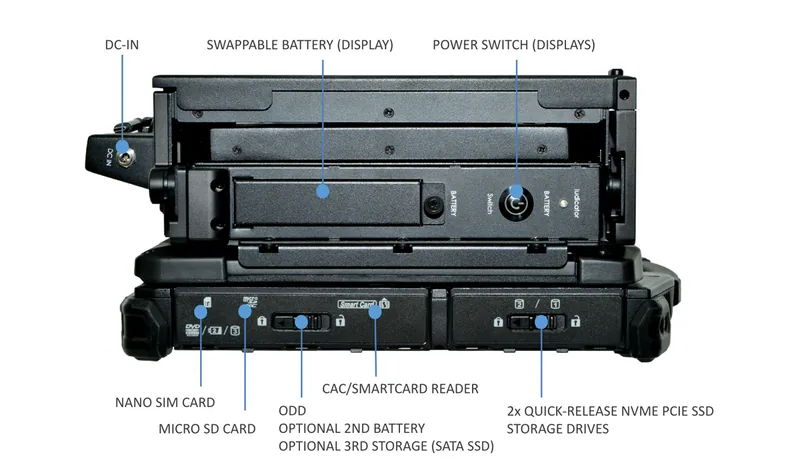
Memory and storage: 2 slots, 16 GB up to 64 GB DDR5 (5600 MHz); 256 GB NVMe PCIe SSD, optional 512 GB/1 TB/2 TB, OPAL 2.0 SSD, second NVMe SSD or third SATA SSD.
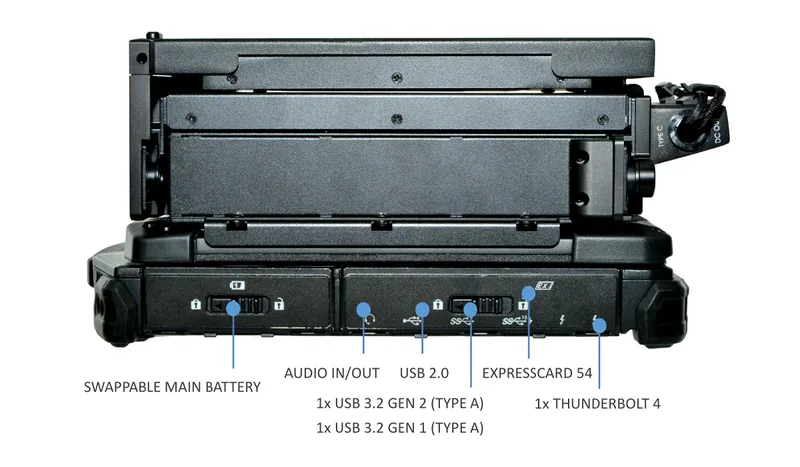
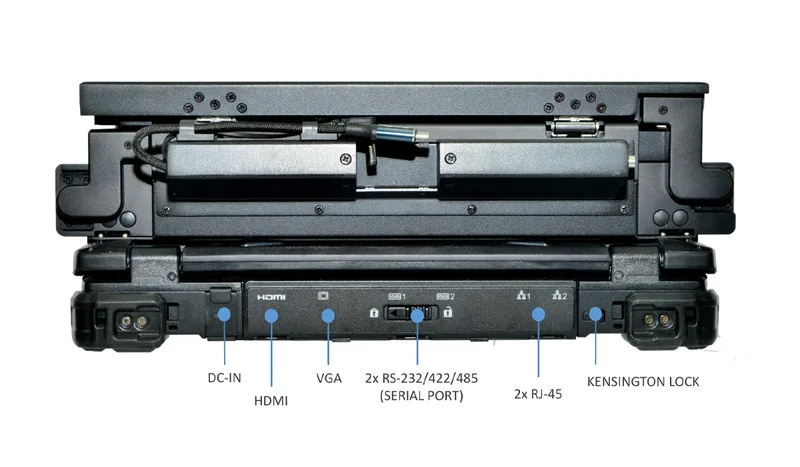
Interfaces: 1× Thunderbolt 4 (Type-C), 1× USB 3.2 Gen 2, 1× USB 3.2 Gen 1 and 1× USB 2.0 (all Type-A), 2× Ethernet (RJ45), 2× serial (RS232/RS422/RS485), HDMI 2.1, VGA, microSD, smart card reader, ExpressCard 54, docking connector (41-pin pogo).
Wireless: Intel® Wi-Fi 7 BE200 (802.11be), Bluetooth 5.4, Ethernet 10/100/1000; dual SIM (Nano SIM and eSIM); optional GPS module (UBLOX-NEO-M9N), 4G LTE (multi-carrier) and 5G.
Ruggedness:MIL-STD-810H and MIL-STD-461G, magnesium alloy chassis, port covers, operating temperature −29 °C to 63 °C; the datasheet gives no IP rating.
Power: main battery Li-Ion, 10.8 V, 6900 mAh (removable, quick-release); optional second battery, 4700 mAh; additional battery for the displays, 14.4 V, 6700 mAh; AC adapter 100–240 V, 210 W.
Expansion and accessories: media bay (one option only): DVD super multi, second battery or SATA SSD; optional expansion box: PCI-Express 3.0 (2 slots), discrete VGA or storage extension with RAID 0/1/5/10.
Dimensions, weight, warranty: 391 × 298 × 137.5 mm, 9.8 kg (depending on options), 3-year limited warranty.
Notes in the datasheet: for Secured-Core PC, Windows Hello, the RFID reader, NVIDIA graphics, the third SATA SSD and the expansion box options, availability must be checked with the sales representative. Weight and dimensions depend on the selected options. For optimal graphics performance Durabook recommends at least 32 GB of memory and at least a 512 GB SSD.
Positioning
On its manufacturer page (durabook.com, retrieved 20.10.2026) Durabook describes the Z14I-DX3 as a portable workstation for mobile command and field operations: it is meant for command vehicles, temporary operations centers, emergency-response locations and industrial environments, and live video, maps, telemetry and reports are to stay visible side by side across the three displays. According to the manufacturer both expansion displays fold inward and stay attached to the unit for transport. The manufacturer page also names, as an option, the custom integration of joysticks and switches into a ground control station for unmanned systems; the datasheet (PDF) says nothing about this. The article Mobile workstation: what is it? explains what defines the device class “mobile workstation”; the blog article on the Z14I-DX3 puts its use in command and control into context.
The closest related device in our range is the Durabook Z14I with a single 14.0 inch display: according to its datasheet it weighs 3.6 kg, states IP66 and has 2× Thunderbolt 4. The Z14I-DX3 weighs 9.8 kg according to its datasheet, states no IP rating and has 1× Thunderbolt 4; in return it offers two serial ports (RS232/RS422/RS485) instead of 2× RS-232, plus two expansion displays. Compared with the Getac X600 (15.6 inches, 4.41 kg, IP66, 1000 nits) and the Durabook S15 (15.6 inches, 2.6 kg, IP53 optional) the DX3 is considerably heavier, but it is the only one of the devices named that has more than one display. The Durabook Z14I-HG is a separate model with its own page and datasheet.
What it is not suited for: at 9.8 kg (depending on options) and 391 × 298 × 137.5 mm, the Z14I-DX3 is in our assessment not designed to be carried on the body or operated by hand, but for use at a fixed location, in a vehicle or in a temporary operations center. The datasheet gives no IP rating, no drop height and no battery runtime; anyone planning to use the device in rain, dust or water jets should ask the manufacturer for these figures before enquiring. The datasheet also leaves open which processor and which storage configuration belong to the base configuration.
Ruggedness and standards
The datasheet lists MIL-STD-810H with the tests shock, vibration, altitude, freeze/thaw, high and low temperature, temperature shock, humidity, explosive atmosphere and solar radiation, plus MIL-STD-461G with the test areas conduction, radiation, conducted susceptibility and radiated susceptibility (electromagnetic compatibility). “Explosive atmosphere” is a test method of MIL-STD-810H; the datasheet names no approval for explosive atmospheres (for example ATEX). What lies behind the test methods is described in the article MIL-STD-810 for laptops and tablets.
The chassis is made of magnesium alloy and has port covers; the battery and two storage drives can be swapped as quick-release parts. The operating temperature is −29 °C to 63 °C (−20 °F to 145 °F), the storage temperature −51 °C to 71 °C, and the permitted humidity 5 % to 95 %. The datasheet gives no IP rating, and port covers alone do not prove a level of protection against dust or water. The standard warranty is three years (3-year limited warranty).
Display and readability
The Z14I-DX3 has three displays of 14.0 inches each with FHD resolution (1920 x 1080). For the DynaVue® display the datasheet gives 1200 nits and describes it as sunlight readable, without distinguishing between the three screens; the manufacturer page speaks of up to 1200 nits for all three displays. Touch input is capacitive (multi-touch); the mode can be selected for finger/water, glove or stylus.
According to the manufacturer page each expansion display has its own OSD controls, so brightness and contrast can be set per screen; the datasheet itself lists OSD navigation keys. The keyboard is a membrane keyboard with LED backlight, and two keys (P1/P2) are user-definable. The datasheet also names a stealth mode and a night vision mode without explaining their function.
Processor, graphics and software
Four processors of the Intel® Core™ Ultra series are available: 5 125U (up to 4.3 GHz), 5 135U (up to 4.4 GHz), 7 155U (up to 4.8 GHz) and 7 165U (up to 4.9 GHz), each with 12 MB cache, 12 cores, 14 threads and an integrated Intel® AI Boost NPU. The graphics are given as Intel® Graphics, optionally NVIDIA® RTX A500, RTX 3500 Ada with 12 GB GDDR6 or RTX 5000 Ada with 16 GB GDDR6. According to the manufacturer page the NPU accelerates supported AI tasks; Durabook names the optional RTX 5000 Ada for AI analysis (image and video analysis) as well as for GIS and 3D applications.
The datasheet contains no performance figures such as TOPS or benchmarks. The operating system is Windows 11 Pro 64-bit, and the memory consists of 2 slots with 16 GB up to 64 GB DDR5 (5600 MHz). The datasheet does not say which processor tier belongs to the base configuration.
Interfaces and expansion
The datasheet lists the following interfaces:
1× Thunderbolt 4 (Type-C)
1× USB 3.2 Gen 2 (Type-A)
1× USB 3.2 Gen 1 (Type-A)
1× USB 2.0 (Type-A)
1× audio combo jack (in/out)
1× microSD (microSDXC)
2× Ethernet (RJ45, 10/100/1000)
1× VGA (D-sub, 15-pin)
1× HDMI 2.1 (Type-A)
2× serial (RS232/RS422/RS485, D-sub 9-pin)
1× docking connector (41-pin pogo)
Dual SIM (Nano SIM and eSIM)
1× smart card reader
1× ExpressCard 54
1× DC-in jack
optional RF antenna pass-through for GPS, WWAN and WLAN
According to the datasheet the media bay takes one option only: DVD super multi, second battery or SATA SSD. The optional expansion box offers PCI-Express 3.0 (2 slots), a discrete VGA or a storage extension with RAID 0/1/5/10; these three options are mutually exclusive. According to the manufacturer page they allow, among other things, portable server deployments. Also integrated are a 2.0 MP webcam with shutter, a microphone and two speakers.
Power supply
The main battery in the unit is a Li-Ion battery with 10.8 V and 6900 mAh, replaceable as a quick-release part. An optional second battery (Li-Ion, 10.8 V, 4700 mAh) is available for the media bay. The datasheet also lists a battery for the screens (Li-Ion, 14.4 V, 6700 mAh); it does not state explicitly whether it belongs to the base configuration.
The AC adapter is rated for 100–240 V and 50–60 Hz and delivers 210 W; according to the manufacturer page one AC adapter powers the whole system. The datasheet gives no battery runtime.
Wireless and positioning
Stated are Intel® Wi-Fi 7 BE200 (802.11be), Bluetooth 5.4 and integrated Ethernet (10/100/1000) as well as dual SIM (Nano SIM and eSIM). Optional are a dedicated GPS module (UBLOX-NEO-M9N), 4G LTE with multiple carriers (multi-carrier) and 5G, plus an optional RF antenna pass-through for GPS, WWAN and WLAN.
Security
The datasheet names Intel vPro® Technology, Secured-Core PC, TPM 2.0, a NIST-compliant BIOS, an easily removable SSD, a smart card reader, stealth mode, night vision mode and a Kensington lock. Optional are Windows Hello (with a 5.0 MP IR camera), a fingerprint scanner and an LF/HF-RFID (NFC) reader; for Secured-Core PC, Windows Hello and the RFID reader the datasheet refers to the sales representative for availability.
Accessories according to the manufacturer
The datasheet (PDF) has no accessories section. The manufacturer page for the Z14I-DX3 (durabook.com, retrieved 20.10.2026) names:
3rd SSD for media bay
Battery charger, 2 bays
Battery charger, 8 bays
Removable 2nd battery for media bay
Removable Super Multi DVD for media bay
Screen protector film Z14I
Spare main battery Z14I
Spare PCIe SSD with canister Z14I
Spare stylus and tether for capacitive touch
USB 3.0 docking station
USB-C docking station
Common questions
How heavy is the Durabook Z14I-DX3?
9.8 kg at 391 × 298 × 137.5 mm (L × W × H). According to the datasheet, weight and dimensions depend on the selected options.
Does Durabook state an IP rating?
No. The datasheet (Sep. 2026_V1) contains neither an IP rating nor a drop height. It lists MIL-STD-810H, MIL-STD-461G and port covers.
Does the device have Thunderbolt and serial ports?
Yes: 1× Thunderbolt 4 (Type-C) and 2× serial (RS232/RS422/RS485, D-sub 9-pin), plus 2× Ethernet (RJ45).
How much memory and storage is possible?
2 slots with 16 GB up to 64 GB DDR5 (5600 MHz); 256 GB NVMe PCIe SSD, optionally 512 GB, 1 TB or 2 TB, plus an optional second NVMe SSD and a third SATA SSD. Two storage drives can be swapped as quick-release parts.
Which graphics options are there?
Intel® Graphics as standard; optional NVIDIA® RTX A500, RTX 3500 Ada (12 GB GDDR6) or RTX 5000 Ada (16 GB GDDR6). Availability must be checked with the sales representative; for optimal graphics performance Durabook recommends at least 32 GB of memory and at least a 512 GB SSD.
Compared with neighbouring models
All values from the respective data sheets; “–” means: not stated by the manufacturer:
Select the desired features. You can then transfer your configuration to your quote request – we will discuss pricing with you personally there.
Your configuration
This overview is a summary of your selection, not a verified configuration – we will confirm technical feasibility (especially for mutually exclusive options) bindingly in the quote.